


Wireshark kya hai aur kaise use kare? Is beginner guide me Wireshark installation, packet capture, filters, TCP handshake aur HTTPS analysis ko simple Hindi me samjhen.
Introduction
Agar aap cyber security, ethical hacking ya networking seekh rahe hain, to Wireshark ka naam aapne zaroor suna hoga. Jaise Nmap network scanning ke liye famous hai, waise hi Wireshark network traffic analysis ke liye duniya ka sabse popular tool hai.
Cyber security me sirf open ports dekhna kaafi nahi hota. Hume ye bhi samajhna hota hai ki network ke andar actual data kaise travel kar raha hai. Kaun si request ja rahi hai? Kaun si response aa rahi hai? Data encrypted hai ya plain text me?
In sab sawalon ka jawab Wireshark deta hai.
Is beginner-friendly guide me hum Wireshark ko bilkul basic se samjhenge — kya hai, kaise install kare, kaise use kare, aur basic packet analysis kaise kare.
Wireshark Kya Hai?
Wireshark ek open-source network protocol analyzer hai jo network traffic ko capture aur analyze karne ke liye use hota hai.
Simple language me:
Wireshark ek aisa tool hai jo network ke andar jaane wale data packets ko record karke aapko detail me dikhata hai.
Ye aapko batata hai:
- Kaun si website open ho rahi hai
- Kaun sa protocol use ho raha hai (HTTP, HTTPS, DNS, TCP)
- Kaun sa IP address kis se communicate kar raha hai
- Data encrypted hai ya plain text
Wireshark ko security professionals, network engineers aur ethical hackers troubleshooting, monitoring aur investigation ke liye use karte hain.
Packet Kya Hota Hai?
Network me data chhote-chhote pieces me travel karta hai jise packet kehte hain.
Har packet me hota hai:
- Source IP
- Destination IP
- Protocol
- Actual Data
Jab aap koi website open karte ho, to data ek hi baar me nahi jata — balki multiple packets me divide hokar travel karta hai.
Wireshark in packets ko capture karke readable format me convert karta hai.
Real-Life Example: Jab Aap Website Open Karte Ho
Maan lijiye aap browser me google.com type karte ho.
Background me ye process hota hai:
- DNS request jati hai (IP address find karne ke liye)
- Server ka IP address milta hai
- TCP Three-Way Handshake hota hai
- HTTPS secure connection establish hota hai
- Website ka data load hota hai
Wireshark in sab steps ko real-time me capture karke dikhata hai.
Isliye Wireshark networking samajhne ke liye ek powerful learning tool hai.
Wireshark Kis Liye Use Hota Hai?
Wireshark ka use kai purposes ke liye hota hai:
- Network troubleshooting
- Security analysis
- Suspicious traffic detect karna
- Packet inspection
- Malware investigation
- Network performance analysis
Companies me SOC (Security Operations Center) teams daily monitoring ke liye Wireshark use karti hain.
Wireshark Install Kaise Kare?
Windows Me Install
- Official website par jaye
- Latest version download kare
- Setup run kare
- Installation complete kare
Installation ke dauran Npcap install karna zaroori hota hai, kyunki packet capture uske through hota hai.
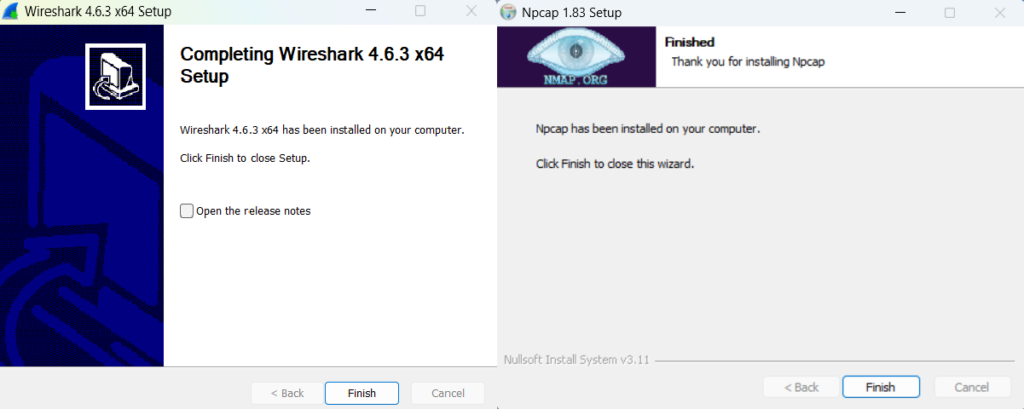
Wireshark ko aap official website se download kar sakte hain.
Kali Linux Me Install
Kali Linux me Wireshark usually pre-installed hota hai.
Check karne ke liye:
wireshark --version
Agar install nahi hai to:
sudo apt update
sudo apt install wireshark
Wireshark Interface Samjhen
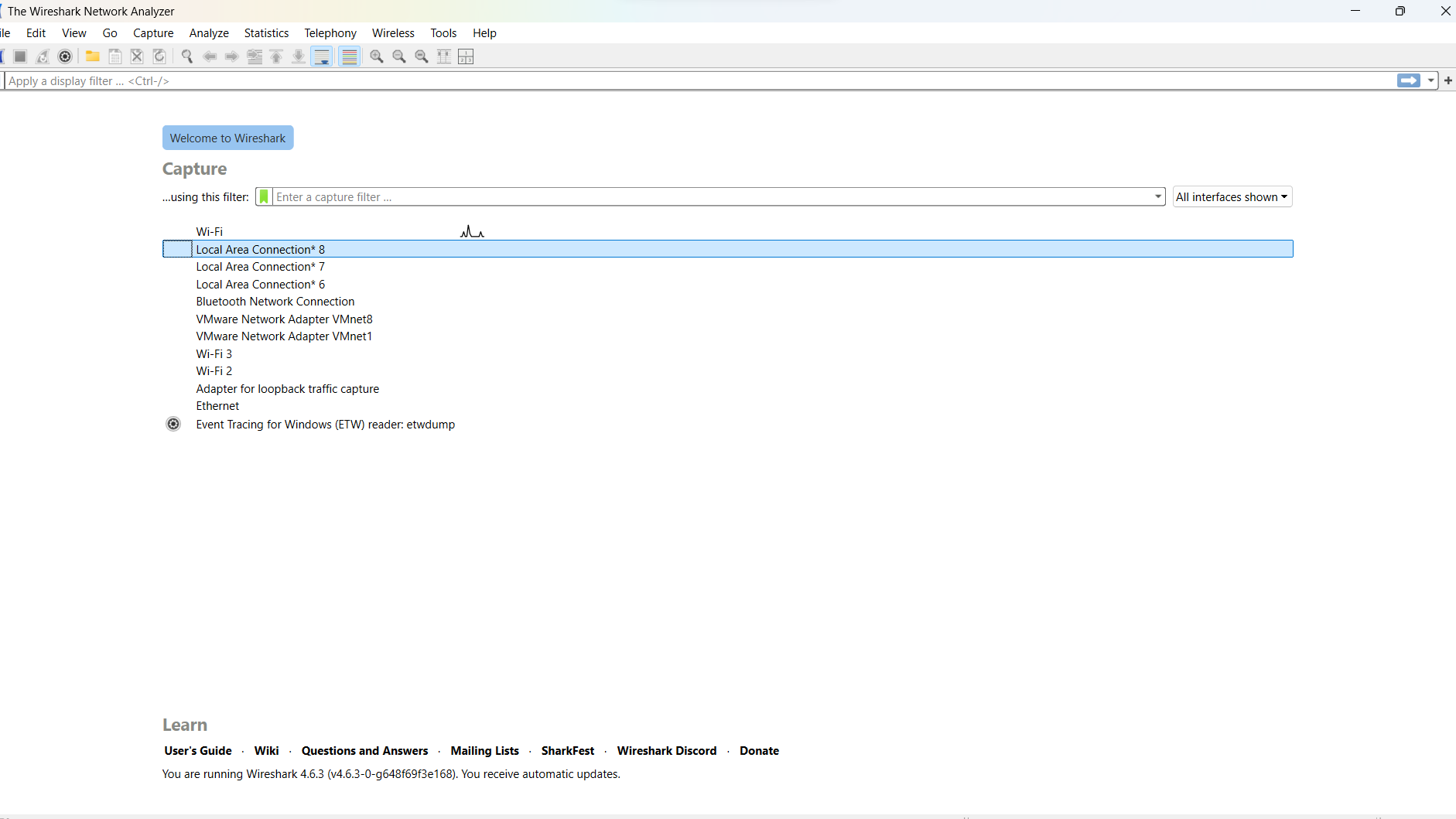
Jab aap Wireshark open karte ho, aapko multiple network interfaces dikhte hain.
Example:
- eth0
- wlan0
- lo
Agar aap WiFi use kar rahe ho to:
wlan0 select kare
Agar wired connection hai to:
eth0 select kare
Sahi interface select karna bahut important hai — warna packets capture nahi honge.
Packet Capture Kaise Kare?
Step 1: Interface Select Kare
Wireshark open kare aur active interface par double click kare.
Step 2: Traffic Generate Kare
Browser open kare aur koi website visit kare.
Wireshark automatically packets capture karna start kar dega.
Step 3: Stop Button Press Kare
Jab enough data capture ho jaye to red stop button dabaye.
Shortcut: Ctrl + E se start/stop kar sakte hain.
Wireshark Output Kaise Samjhen?
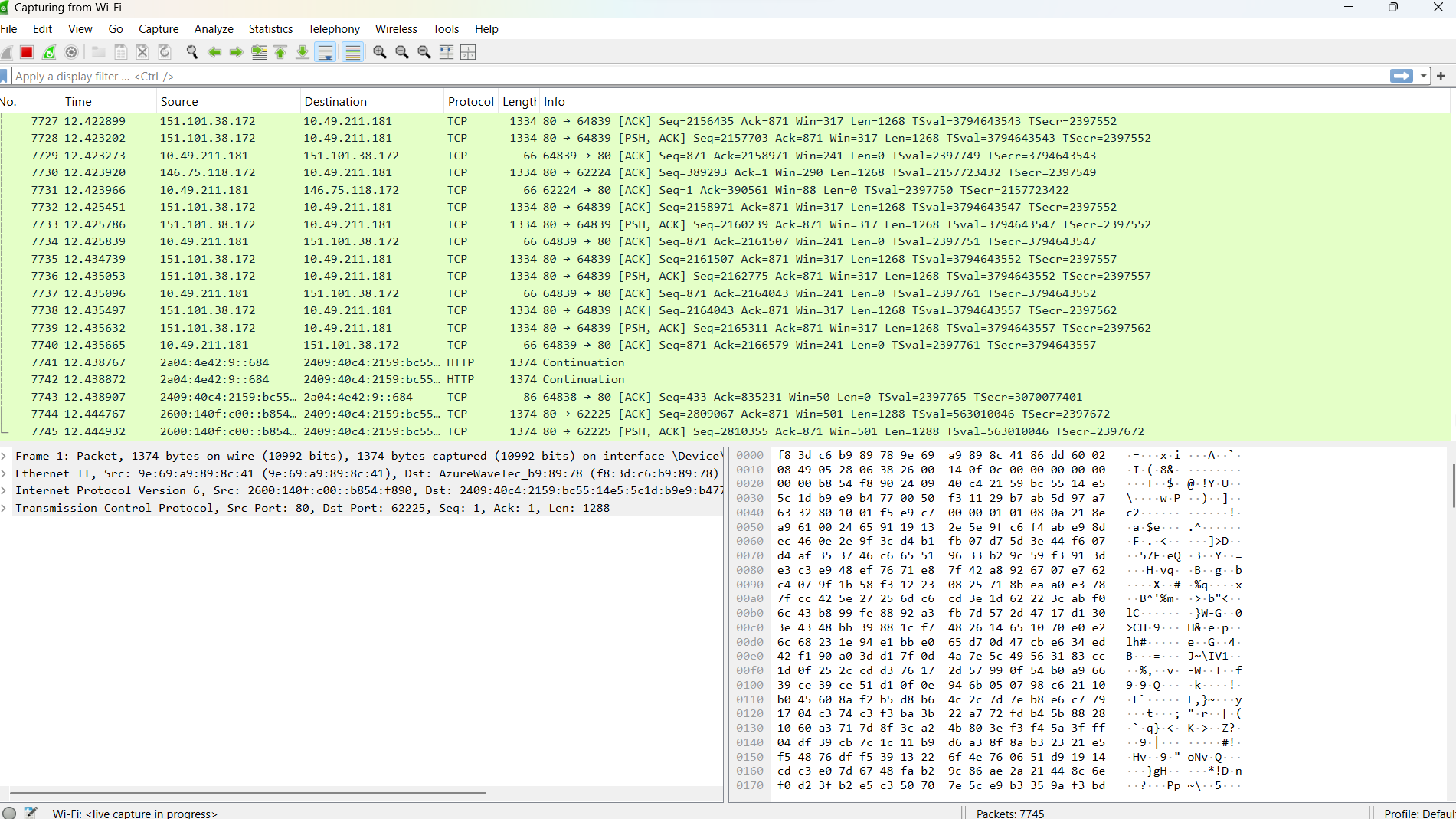
Wireshark window 3 parts me divided hoti hai:
- Packet List Pane
- Packet Details Pane
- Packet Bytes Pane
Packet List Pane
Yahan aap dekhte ho:
- Time
- Source
- Destination
- Protocol
- Length
- Info
Example:
- DNS request
- TCP handshake
- HTTP request
Packet Details Pane me protocol ka detailed breakdown milta hai.
Packet Bytes Pane me raw hexadecimal data hota hai.
Wireshark Aur OSI Model
Wireshark network ke different layers ke protocols ko capture karta hai:
Layer 2 → ARP
Layer 3 → IP
Layer 4 → TCP / UDP
Layer 7 → HTTP / DNS
Agar aap OSI Model samajh lete ho to Wireshark analysis easy ho jata hai, kyunki aapko pata hota hai kaunsa protocol kis layer ka hai.
Important Protocols Jo Beginners Ko Seekhne Chahiye
- TCP
- HTTP
- DNS
- ARP
- HTTPS (TLS)
Beginners ke liye sabse important:
TCP, HTTP aur DNS.
Filters Ka Use Kaise Kare?
Wireshark me bahut traffic hota hai. Isliye filter use karna zaroori hai.
Example Filters:
Sirf HTTP dekhne ke liye:
http
Sirf DNS dekhne ke liye:
dns
Sirf TCP dekhne ke liye:
tcp
Specific IP dekhne ke liye:
ip.addr == 192.168.1.1
Filters analysis ko easy bana dete hain.
Display Filter vs Capture Filter
Wireshark me do type ke filters hote hain:
Display Filter → Capture ke baad apply hota hai
Capture Filter → Capture start hone se pehle apply hota hai
Example:
Display filter:
http
Capture filter:
port 80
Beginners ko in dono ka difference samajhna bahut zaroori hai.
TCP Three-Way Handshake Wireshark Me Kaise Dekhen?
- Browser se koi website open kare
- Wireshark me filter lagaye:
tcp
Aap dekhenge:
SYN
SYN-ACK
ACK
Ye TCP connection establish hone ka process hota hai.
HTTPS Traffic Kyun Readable Nahi Hota?
Agar aap filter lagate ho:
tls
Aap encrypted data dekhenge.
HTTPS me data encrypted hota hai, isliye readable nahi hota.
Ye actually security ka sign hai.
Wireshark Se Password Capture Kar Sakte Hain?
Important clarification:
Agar website HTTP use karti hai to plain text visible ho sakta hai.
Lekin HTTPS me data encrypted hota hai.
Aur bina permission kisi ka data intercept karna illegal hai.
Hamesha legal lab environment me hi practice kare.
Beginners Ke Liye Practice Kaise Kare?
Safe practice ke liye:
- Apna local network use kare
- Apni virtual machines use kare
- Legal lab environment use kare
Practice 1: DNS Capture
Filter lagaye:
dns
Kisi website ko open kare aur DNS request observe kare.
Practice 2: TCP Handshake Observe Kare
Filter:
tcp
SYN, SYN-ACK, ACK packets dekhe.
Practice 3: HTTPS Traffic Dekhe
Filter:
tls
Encrypted packets observe kare.
Common Mistakes Jo Beginners Karte Hain
- Wrong interface select karna
- Filters use na karna
- Har packet analyze karne ki koshish
- Legal rules ignore karna
Best approach:
Step-by-step practice kare
Sirf basic protocols se start kare
Notes banaye
Wireshark vs Nmap
| Feature | Wireshark | Nmap |
|---|---|---|
| Purpose | Packet Analysis | Port Scanning |
| Real-Time Traffic | Yes | No |
| Recon Tool | No | Yes |
| Deep Inspection | Yes | Limited |
- Nmap batata hai kaun se ports open hain
- Wireshark batata hai un ports par kya ho raha hai
Dono tools alag purpose serve karte hain.
Wireshark Seekhne Se Career Kaise Banega?
Wireshark ka use hota hai:
- SOC Analyst
- Network Security Engineer
- Penetration Tester
- Cyber Forensic Analyst
Real cyber attack investigation me Wireshark ka use hota hai.
Agar aap cyber security field me career banana chahte hain, to Wireshark ek must-learn tool hai.
Frequently Asked Questions (FAQs)
Q1: Kya Wireshark free hai?
Haan, Wireshark completely free aur open-source hai.
Q2: Kya Wireshark illegal hai?
Tool legal hai. Bina permission kisi ka traffic capture karna illegal ho sakta hai.
Q3: Beginner ko kya seekhna chahiye?
Basic packet capture + filters + TCP handshake.
Q4: Kya Wireshark Windows me chalta hai?
Haan, Windows, Linux aur Mac tino me available hai.
Conclusion
Wireshark cyber security aur network analysis ka ek powerful tool hai jo aapko network ke andar hone wali har activity ko detail me dekhne ki capability deta hai.
Agar aap beginner ho to sabse pehle:
- Interface select karna
- Basic capture karna
- Filters use karna
- TCP aur DNS samajhna
Ye 4 cheeze master kare.
Regular safe practice se aapka packet analysis strong ho jayega.
What’s Next?
Next Guide:
Metasploit Kya Hai Aur Kaise Use Kare? (Beginner Guide)
Agar aap Nmap aur port scanning ke baare me nahi jaante, to pehle un guides ko padhein.
Important Note
Ye content sirf educational purpose aur cyber security awareness ke liye share kiya gaya hai. Bina permission kisi system ya network ka traffic capture karna illegal ho sakta hai. Hamesha ethical boundaries ke andar rehkar hi practice karein.
Agar aap port scanning ke baare me nahi jaante to Nmap tutorial zaroor padhein.


Pingback: Nmap Port Scanning Types in Hindi (2026) - Tech Defances
Pingback: Metasploit Kya Hai? Beginner Guide in Hindi - Tech Defances