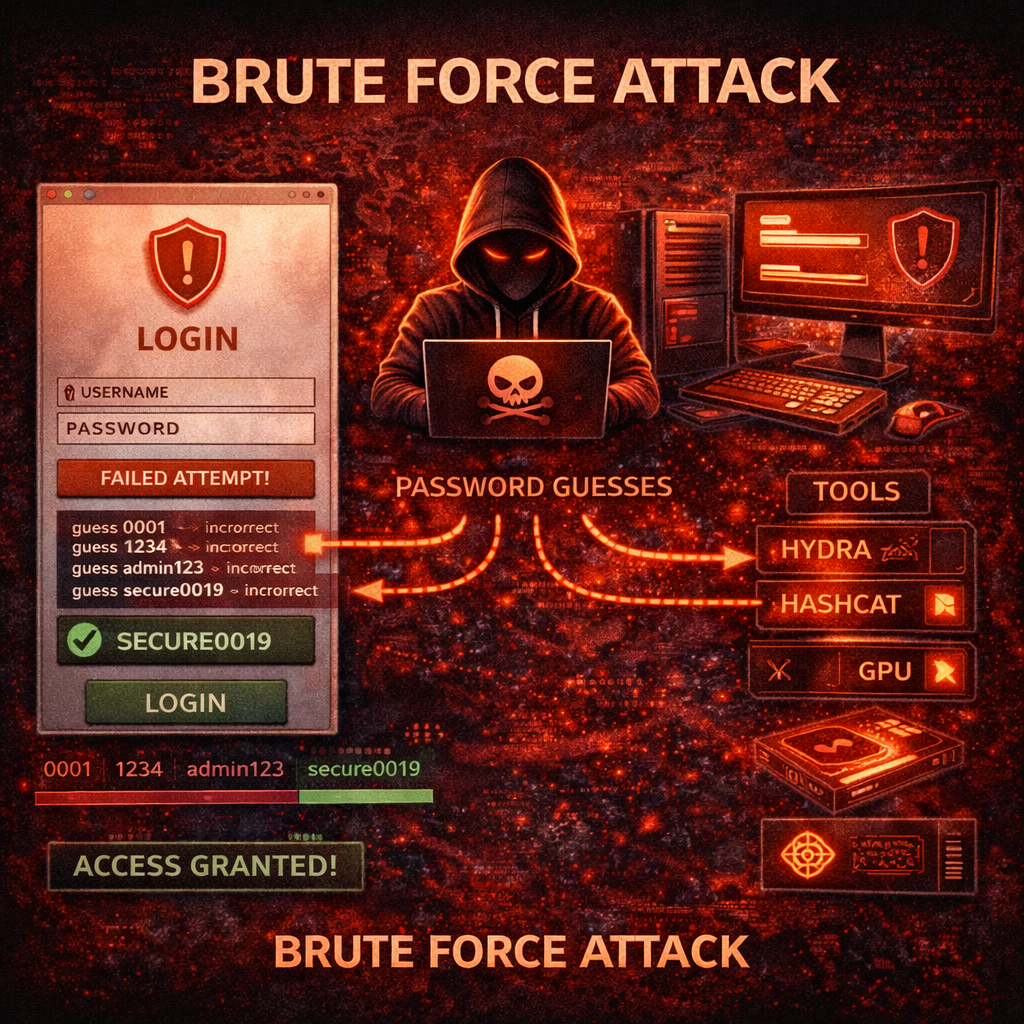
Cyber security ke world me passwords sabse basic security layer hote hain. Almost har online account – email, social media, bank account, website login, aur company servers – sabhi password protection par depend karte hain. Lekin agar password weak ho ya system me proper security na ho, to attackers us password ko guess karke system access kar sakte hain.
Isi technique ko Brute Force Attack kaha jata hai.
Brute force attack cyber security ka ek important concept hai jisme attacker systematically har possible password combination try karta hai jab tak correct password mil na jaye. Yeh method simple lag sakta hai, lekin modern tools aur powerful computers ke saath brute force attack bahut dangerous ho sakta hai.
Is article me hum detail me samjhenge:
- Brute force attack kya hota hai
- Yeh kaise kaam karta hai
- Iske different types
- Real world examples
- Attackers kaun se tools use karte hain
- Brute force attacks se kaise bacha ja sakta hai
- Strong password kaise banaye
- Cyber security me iska role kya hai
Yeh guide beginners ke liye simple Hindi me likhi gayi hai, lekin isme technical concepts bhi explain kiye gaye hain.
Brute Force Attack Kya Hota Hai?
Brute force attack ek cyber attack technique hai jisme attacker kisi password ko guess karne ke liye har possible combination try karta hai. Is process me automated tools use kiye jate hain jo thousands ya millions password combinations ko test karte hain.
Simple language me samjhe to brute force attack ka matlab hai:
“Har possible password try karo jab tak correct password mil na jaye.”
Example ke liye agar kisi account ka password 4 digit ka number hai, to attacker ye combinations try kar sakta hai:
0000
0001
0002
0003
...
9999
Eventually correct password mil sakta hai.
Agar password chhota aur simple ho to brute force attack successful hone ke chances zyada hote hain.
Brute Force Attack Kaise Kaam Karta Hai?
Brute force attack usually automated scripts aur tools ke through perform kiya jata hai. Attacker manually password guess nahi karta, balki computer program use karta hai jo fast speed se password combinations try karta hai.
Brute force attack ke basic steps kuch is tarah hote hain:
- Attacker target website ya login system identify karta hai
- Automated tool use karke password attempts start karta hai
- Tool multiple combinations try karta hai
- Agar correct password mil jata hai to attacker system access kar leta hai
Yeh attack specially un systems par successful hota hai jahan:
- Password weak ho
- Login attempt limit na ho
- CAPTCHA protection na ho
- Two-factor authentication enabled na ho
Brute Force Attack Kyu Dangerous Hai?
Brute force attack dangerous isliye hai kyunki yeh simple hone ke bawajood effective ho sakta hai. Agar kisi system me security measures weak ho to attacker easily access le sakta hai.
Iske kuch main reasons hain:
- Log weak passwords use karte hain
- Same password multiple accounts me use karte hain
- Login systems me proper protection nahi hota
- Powerful computers password guessing fast bana dete hain
Modern hardware aur GPU computing ki wajah se attackers bahut fast password cracking kar sakte hain.
Brute Force Attack Ke Major Types
Brute force attack ke multiple variations hote hain. Har type ka approach thoda different hota hai.
1. Simple Brute Force Attack
Simple brute force attack me attacker har possible password combination try karta hai. Yeh method time consuming ho sakta hai lekin theoretically correct password eventually mil sakta hai.
Example:
Password length 4 hai:
0000
0001
0002
...
9999
Agar password length badh jaye to combinations exponentially increase ho jate hain.
2. Dictionary Attack
Dictionary attack brute force ka optimized version hota hai.
Isme attacker ek wordlist use karta hai jisme common passwords hote hain.
Example passwords:
123456
password
india123
admin
qwerty
Kyuki log simple aur common passwords use karte hain, dictionary attack ka success rate kaafi high hota hai.
3. Hybrid Attack
Hybrid attack dictionary attack aur brute force attack ka combination hota hai.
Isme attacker common words ke saath numbers aur symbols add karta hai.
Example:
password123
admin@2025
india#1
Yeh method brute force se faster hota hai.
4. Credential Stuffing
Credential stuffing me attacker previously leaked passwords ko dusri websites par try karta hai.
Example:
Agar kisi website ka database leak ho gaya aur usme email-password combination mil gaya, to attacker usi combination ko Gmail, Facebook ya banking sites par try kar sakta hai.
Kyuki log password reuse karte hain, credential stuffing successful ho sakta hai.
5. Reverse Brute Force Attack
Reverse brute force me attacker ek common password ko multiple accounts par try karta hai.
Example:
Password: Password@123
Is password ko multiple usernames par test kiya jata hai.
Agar kisi user ne wahi password use kiya ho to attacker login kar sakta hai.
Real World Example
Maan lijiye ek website admin ka password hai:
admin123
Attacker login page par automated tool run karta hai.
Tool thousands combinations try karta hai.
Eventually combination:
admin123
match ho jata hai aur attacker login kar leta hai.
Agar admin ne strong password use kiya hota jaise:
T7!k9@Secure2026
to brute force attack practically impossible ho jata.
Brute Force Attack Me Use Hone Wale Tools
Cyber attackers aur ethical hackers dono kuch tools use karte hain password testing ke liye.
Note: Yeh tools sirf ethical testing aur educational purpose ke liye use hone chahiye.
Hydra
Hydra ek popular brute force tool hai jo network login services par password testing ke liye use hota hai.
Supported protocols:
- SSH
- FTP
- HTTP
- RDP
- Telnet
John the Ripper
John the Ripper ek powerful password cracking tool hai jo hashed passwords ko crack karne ke liye use hota hai.
Yeh Linux environments me popular hai.
Hashcat
Hashcat GPU-based password cracking tool hai jo extremely fast hota hai.
Large hash files crack karne ke liye use hota hai.
Aircrack-ng
Aircrack-ng WiFi password testing ke liye use hota hai.
WEP aur WPA networks ke against testing ke liye use hota hai.
Password Length Ka Impact
Password length brute force attack ko directly affect karti hai.
Example:
4 character password → seconds me crack ho sakta hai
8 character password → hours ya days lag sakte hain
12+ character password → practically impossible
Isliye long password use karna important hai.
Strong Password Kaise Banaye?
Strong password brute force attack se protection deta hai.
Best practices:
- Minimum 12–16 characters
- Uppercase + lowercase + numbers + symbols
- Predictable words avoid kare
- Har account ke liye unique password use kare
Example strong password:
T9@CyberSecure!2026
Two Factor Authentication (2FA)
2FA additional security layer provide karta hai.
Login ke liye password ke saath:
- OTP
- Authenticator app
- Security key
required hota hai.
Agar password crack bhi ho jaye to attacker login nahi kar paata.
Login Protection Techniques
Websites brute force attacks se bachne ke liye kuch security techniques use karti hain.
Examples:
- CAPTCHA
- Login attempt limit
- Account lockout
- IP blocking
- Multi-factor authentication
Yeh techniques brute force attack ko difficult bana deti hain.
Cyber Security Students Ke Liye Important Advice
Agar aap ethical hacking ya cyber security field me ho, to brute force attack ka concept samajhna important hai.
Lekin:
- Unauthorized systems par testing illegal hai
- Hamesha lab environment use kare
- Kali Linux VM use kare
- Legal platforms par practice kare
Responsible learning hi safe learning hai.
Legal Warning
Unauthorized access aur password cracking illegal ho sakta hai.
India me IT Act 2000 ke under cyber crimes punishable offense hain.
Cyber attacks me involve hone par:
- Fine
- Jail
- Career damage
ho sakta hai.
Isliye knowledge ka misuse nahi karna chahiye.
Future of Password Security
Technology evolve ho rahi hai aur passwords gradually replace ho sakte hain.
New authentication methods:
- Passkeys
- Biometric authentication
- Hardware security keys
future me brute force attacks ko kam effective bana sakte hain.
Conclusion
Brute force attack cyber security ka ek basic lekin powerful concept hai. Isme attacker har possible password combination try karke account access karne ki koshish karta hai.
Yeh attack specially tab successful hota hai jab:
- Password weak ho
- Login protection weak ho
- Security awareness kam ho
Protection ke liye:
- Strong password use kare
- Password reuse avoid kare
- Two-factor authentication enable kare
- Login security implement kare
Cyber security ka simple rule hai:
Strong password = Strong security.
What’s Next?
Next Guide:
Phishing Attack Kya Hota Hai? Types, Real Examples aur Kaise Bach Sakte Hain (2026 Complete Guide)
Important Note
Ye content sirf educational purpose aur cyber security awareness ke liye share kiya gaya hai. Bina permission kisi website ya system par testing karna illegal ho sakta hai.