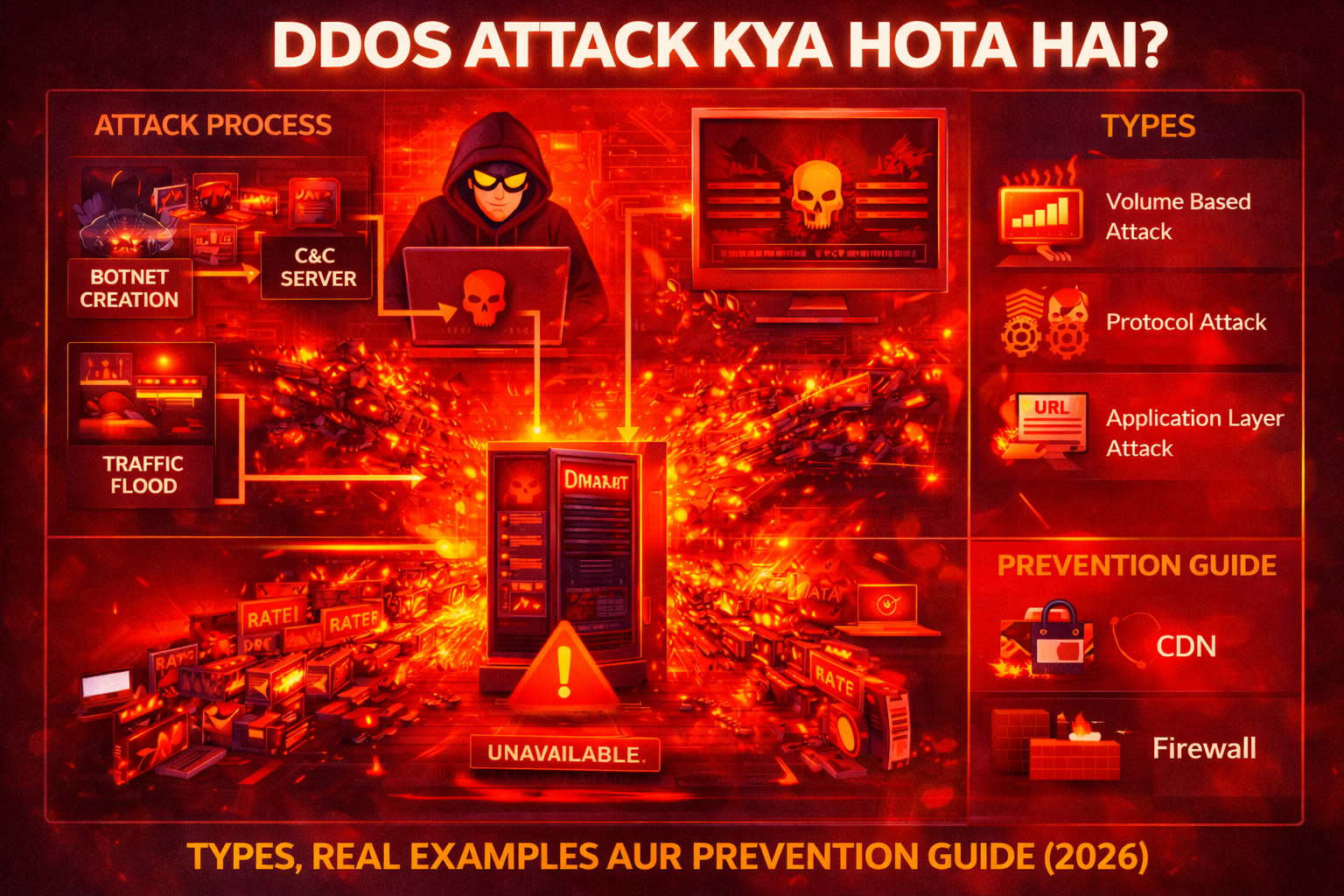
Aaj ke digital world me websites, online services aur cloud systems par cyber attacks ka risk lagatar badh raha hai. Inhi attacks me se ek sabse common aur dangerous attack hai DDoS attack. Ye attack websites aur online services ko temporarily ya permanently unavailable bana sakta hai.
DDoS attack ka use hackers, cyber criminals aur kabhi-kabhi hacktivist groups bhi karte hain taaki kisi website, server ya network ko overload karke uski services ko band kiya ja sake.
Is detailed guide me hum DDoS attack ko simple language me samjhenge:
- DDoS attack kya hota hai
- DDoS attack kaise kaam karta hai
- DDoS ke types
- Real world DDoS attack examples
- DDoS attack se kaise bacha ja sakta hai
Ye guide beginners, students aur cyber security learners ke liye banayi gayi hai.
DDoS Attack Kya Hota Hai?
DDoS ka full form hota hai: Distributed Denial of Service.
DDoS attack ek cyber attack hai jisme attacker ek website, server ya network par bahut zyada traffic bhej kar system ko overload kar deta hai.
Jab server par normal se bahut zyada requests aati hain, to server unhe handle nahi kar pata aur website crash ho jati hai ya slow ho jati hai.
Simple language me:
DDoS attack = Server ko itni requests bhejna ki wo kaam karna band kar de.
Example:
Agar kisi website par normally 100 users aate hain lekin attacker ek saath 1 lakh fake requests bhej de, to server overload ho jayega aur website down ho sakti hai.
Is attack ka main goal hota hai:
- website ko crash karna
- online services ko disrupt karna
- business operations ko rokna
DoS aur DDoS Attack Me Difference
DDoS attack ko samajhne ke liye DoS attack ko samajhna bhi zaruri hai.
| Feature | DoS Attack | DDoS Attack |
|---|---|---|
| Full Form | Denial of Service | Distributed Denial of Service |
| Attack Source | Single computer | Multiple computers |
| Traffic Volume | Limited | Extremely high |
| Detection | Easy | Difficult |
| Impact | Medium | Very High |
DDoS attack me attackers multiple infected computers (botnets) ka use karte hain.
Isi wajah se DDoS attacks ko stop karna difficult hota hai.
DDoS Attack Kaise Kaam Karta Hai?
DDoS attack ek planned process hota hai jisme attacker pehle botnet create karta hai aur phir target server par massive traffic bhejta hai.
Typical DDoS attack process:
1. Botnet Creation
Attacker sabse pehle multiple computers ya devices ko malware se infect karta hai.
Ye infected devices ban jate hain:
Botnet
Botnet me ho sakte hain:
- computers
- servers
- IoT devices
- routers
In sab devices ko attacker remotely control karta hai.
2. Command and Control Server
Attacker ek command and control (C&C) server use karta hai jisse botnet devices ko commands di jati hain.
Is server ke through attacker instructions bhejta hai:
“Target website par attack start karo.”
3. Traffic Flood
Botnet ke thousands ya millions devices ek saath target website par traffic bhejna start kar dete hain.
Isse:
- server overload ho jata hai
- bandwidth exhaust ho jati hai
- services unavailable ho jati hain
4. Website Crash
Jab server requests handle nahi kar pata to:
- website slow ho jati hai
- error messages aate hain
- website down ho jati hai
Isse users website access nahi kar pate.
DDoS Attack Ke Types
DDoS attacks multiple types ke hote hain. Har attack ka method aur impact alag hota hai.
1. Volume Based Attacks
Volume based attacks ka main goal hota hai network bandwidth ko flood karna.
Isme attackers massive amount me traffic bhejte hain.
Examples:
- UDP flood
- ICMP flood
Impact:
Server aur network bandwidth overload ho jati hai.
2. Protocol Attacks
Protocol attacks server resources ko exhaust karne ke liye design kiye jate hain.
Ye attacks network protocol weaknesses ko exploit karte hain.
Examples:
- SYN flood
- Ping of death
- Smurf attack
Impact:
Server connection resources exhaust ho jate hain.
3. Application Layer Attacks
Application layer attacks websites ke application layer ko target karte hain.
Ye attacks detect karna difficult hota hai.
Examples:
- HTTP flood
- Slowloris attack
Impact:
Website ka web server slow ho jata hai ya crash ho jata hai.
Popular DDoS Attack Methods
DDoS attacks me kai techniques use hoti hain.
UDP Flood Attack
UDP flood me attacker large number of UDP packets send karta hai.
Server in packets ko process karne ki koshish karta hai aur overload ho jata hai.
SYN Flood Attack
SYN flood TCP handshake process ko exploit karta hai.
Attacker incomplete connection requests bhejta hai jisse server resources waste ho jate hain.
HTTP Flood Attack
HTTP flood web servers ko target karta hai.
Botnet devices repeatedly website pages request karte hain.
Result:
Web server overload ho jata hai.
Real World DDoS Attack Examples
Cyber security history me kai famous DDoS attacks ho chuke hain.
1. Dyn DNS Attack (2016)
2016 me Dyn DNS service par ek massive DDoS attack hua tha.
Is attack ke wajah se multiple popular websites temporarily down ho gayi thi:
- Netflix
- GitHub
Ye attack Mirai botnet ke through launch kiya gaya tha.
Mirai botnet IoT devices ko infect karta tha.
2. GitHub DDoS Attack (2018)
2018 me GitHub par ek huge DDoS attack hua tha.
Attack traffic:
1.3 Tbps
Ye us time ka sabse bada DDoS attack tha.
GitHub ne quickly mitigation systems activate karke attack ko control kiya.
3. Estonia Cyber Attack (2007)
Estonia par ek large scale cyber attack hua tha jisme government websites aur banks target hue the.
Impact:
- banking services disrupt
- government websites down
Ye attack cyber warfare ka ek example mana jata hai.
DDoS Attack Ka Example Scenario
Ek simple scenario samjhte hain.
Step 1
Ek hacker kisi e-commerce website ko target karta hai.
Step 2
Attacker botnet create karta hai jisme 50,000 infected devices hote hain.
Step 3
Command server ke through attack start hota hai.
Step 4
Botnet devices website par massive traffic bhejna start kar dete hain.
Step 5
Website server requests handle nahi kar pata.
Step 6
Website slow ho jati hai ya crash ho jati hai.
Result:
Customers website access nahi kar pate aur company ko financial loss hota hai.
DDoS Attack Ke Signs
Agar kisi website par DDoS attack ho raha ho to kuch warning signs dikhai dete hain.
Common signs:
- website suddenly slow ho jana
- website inaccessible ho jana
- unusual traffic spike
- server errors
- network latency increase
Agar aise symptoms dikhe to server logs check karna zaruri hota hai.
DDoS Attack Se Kaise Bache?
DDoS attacks se bachne ke liye strong cyber security strategies implement karni chahiye.
1. Content Delivery Network (CDN) Use Kare
CDN services traffic ko multiple servers me distribute kar deti hain.
Popular CDN services:
- Cloudflare
- Akamai
CDN DDoS attacks ko mitigate karne me help karta hai.
2. Web Application Firewall (WAF)
Web application firewall malicious traffic ko detect aur block kar sakta hai.
WAF suspicious requests ko filter karta hai.
3. Rate Limiting
Rate limiting ek technique hai jisme server ek IP address se aane wali requests limit kar deta hai.
Example:
Ek IP address se 100 requests per minute.
Isse attack traffic control kiya ja sakta hai.
4. Network Monitoring
Network traffic ko continuously monitor karna chahiye.
Isse unusual traffic patterns detect kiye ja sakte hain.
5. Load Balancing
Load balancers traffic ko multiple servers me distribute kar dete hain.
Isse single server overload nahi hota.
6. DDoS Protection Services
Kai companies specialized DDoS protection services provide karti hain.
Examples:
- Cloudflare
- AWS Shield
- Imperva
Ye services attack traffic ko filter kar sakti hain.
Agar DDoS Attack Ho Jaye To Kya Kare?
Agar kisi organization par DDoS attack ho jaye to immediate response zaruri hota hai.
Important steps:
1. Traffic Analyze Kare
Network traffic logs analyze karna chahiye taaki attack source identify kiya ja sake.
2. Malicious Traffic Block Kare
Suspicious IP addresses ko firewall ke through block kiya ja sakta hai.
3. CDN Activate Kare
CDN services traffic absorb karne me help karti hain.
4. ISP Ko Inform Kare
Internet service provider ko inform karna helpful ho sakta hai.
ISP network level par attack traffic filter kar sakta hai.
DDoS Attacks Kyun Dangerous Hote Hain?
DDoS attacks businesses ke liye serious problem create kar sakte hain.
Reasons:
- website downtime
- financial loss
- customer trust loss
- brand reputation damage
E-commerce websites ke liye DDoS attacks particularly dangerous hote hain.
Agar website downtime ho jaye to companies ko huge revenue loss ho sakta hai.
Future of DDoS Attacks
Cyber criminals continuously new techniques develop kar rahe hain.
Future trends:
- AI powered attacks
- IoT based botnets
- larger traffic floods
Isliye organizations ko advanced cyber security solutions implement karne honge.
Conclusion
DDoS attack ek powerful cyber attack hai jisme attackers massive traffic bhej kar websites aur servers ko overload kar dete hain. Is attack ka main goal online services ko disrupt karna aur business operations ko affect karna hota hai.
DDoS attacks ko launch karne ke liye attackers botnets ka use karte hain jo thousands ya millions infected devices se milkar bante hain. Jab ye devices ek saath target server par requests bhejte hain to server overload ho jata hai aur website down ho sakti hai.
Organizations ko DDoS attacks se bachne ke liye CDN services, firewalls, load balancing aur network monitoring jaise security measures implement karne chahiye.
Strong cyber security practices aur proactive monitoring hi DDoS attacks ke impact ko minimize kar sakti hain.
FAQs
DDoS attack kya hota hai?
DDoS attack ek cyber attack hai jisme attackers ek website ya server par massive traffic bhej kar system ko overload kar dete hain.
DDoS attack ka full form kya hai?
DDoS ka full form Distributed Denial of Service hota hai.
DDoS attack ka example kya hai?
Dyn DNS attack aur GitHub attack famous DDoS attack examples hain.
Kya DDoS attack illegal hai?
Haan, DDoS attack illegal cyber crime hai aur kai countries me punishable offense mana jata hai.
DDoS attack se kaise bacha ja sakta hai?
CDN services, firewalls, rate limiting aur network monitoring DDoS attacks se protection provide kar sakte hain.
What’s Next?
Next Guide:
Trojan Horse Kya Hota Hai? Types, Real Examples aur Prevention Guide (2026)
Important Note
Ye content sirf educational purpose aur cyber security awareness ke liye share kiya gaya hai. Bina permission kisi website ya system par testing karna illegal ho sakta hai.