Cyber security ki duniya me ransomware attack sabse dangerous aur rapidly growing cyber attacks me se ek mana jata hai. Har saal hazaron companies, hospitals, governments aur individual users ransomware ka shikaar ban jate hain. Is attack ka main goal hota hai victim ke system ya files ko lock ya encrypt karke paise (ransom) demand karna.
Agar victim paise nahi deta, to attacker files delete karne ya leak karne ki dhamki deta hai. Isi wajah se ransomware attack ko digital kidnapping bhi kaha jata hai.
Is guide me hum detail me samjhenge:
- Ransomware attack kya hota hai
- Ransomware kaise kaam karta hai
- Ransomware ke types
- Real world ransomware examples
- Ransomware se kaise bacha ja sakta hai
Ye guide beginners se lekar intermediate cyber security learners ke liye banayi gayi hai.
Ransomware Attack Kya Hota Hai?
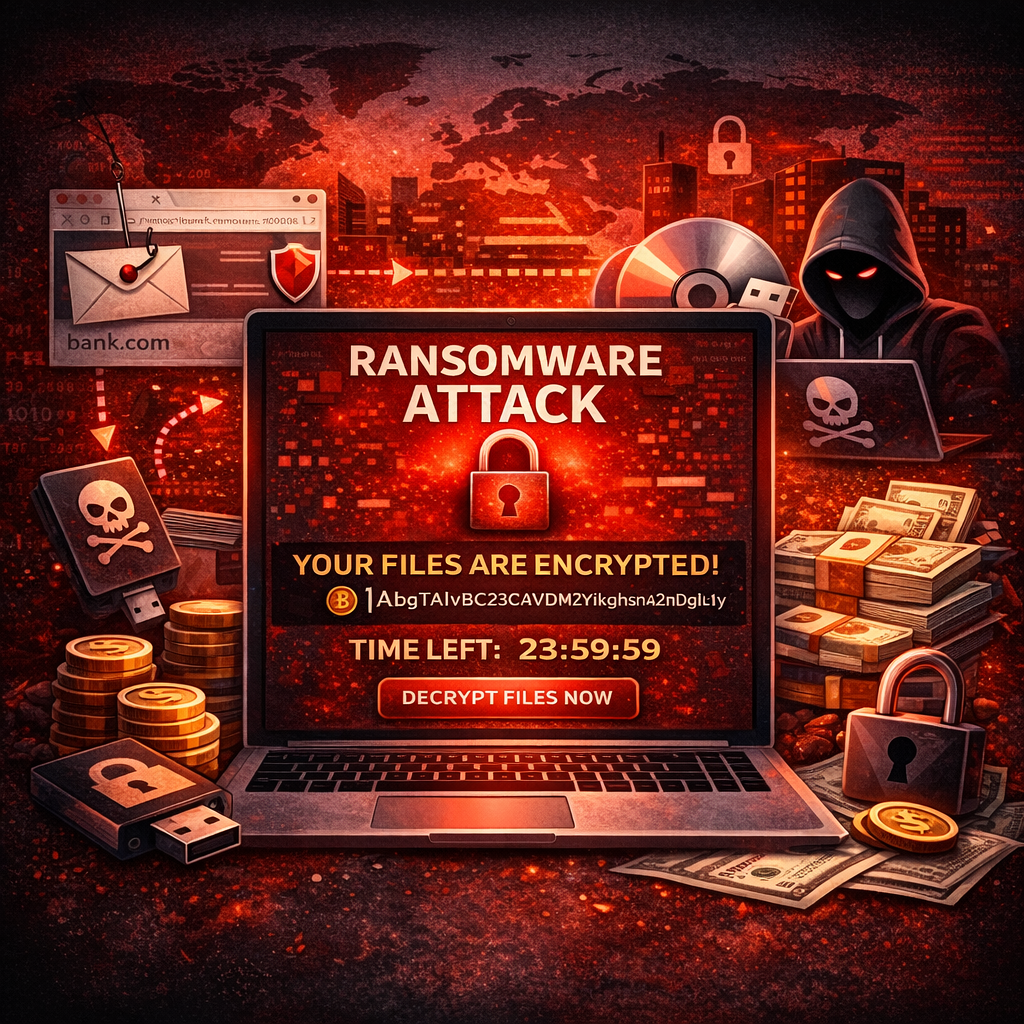
Ransomware ek type ka malware (malicious software) hota hai jo victim ke computer system, files ya network ko lock ya encrypt kar deta hai. Iske baad attacker victim se ransom (paise) demand karta hai taaki files ko unlock kiya ja sake.
Simple language me:
Ransomware = Malware jo files ko lock karta hai aur paise demand karta hai.
Example:
- User ek malicious email attachment download karta hai
- System me ransomware install ho jata hai
- Files automatically encrypt ho jati hain
- Screen par ransom note aa jata hai
- Attacker cryptocurrency me payment demand karta hai
Agar payment nahi ki jati, to files permanently inaccessible ho sakti hain.
Ransomware Attack Kaise Kaam Karta Hai?
Ransomware attack usually ek structured process follow karta hai. Attackers pehle victim ke system me entry lete hain aur phir malware execute karte hain.
Typical ransomware attack steps:
1. Initial Access
Sabse pehle attacker victim ke system me entry leta hai. Ye entry different methods se ho sakti hai:
- phishing emails
- malicious attachments
- fake software downloads
- infected websites
- remote desktop protocol vulnerabilities
2. Malware Execution
User jab malicious file open karta hai to ransomware silently system me install ho jata hai.
3. System Scan
Malware system ko scan karta hai aur important files locate karta hai jaise:
- documents
- databases
- images
- backups
4. File Encryption
Ransomware powerful encryption algorithms use karta hai aur victim ki files encrypt kar deta hai.
Encrypted files open nahi hoti.
5. Ransom Demand
Attack ke baad screen par ek ransom note display hota hai jisme instructions hoti hain:
- kitne paise dene hain
- kis cryptocurrency wallet me payment karni hai
- deadline kya hai
Agar victim deadline miss kar deta hai to ransom amount badh sakta hai ya files delete ho sakti hain.
Ransomware Attack Ke Types
Ransomware ke multiple types hote hain. Har type ka attack method aur impact alag hota hai.
1. Crypto Ransomware
Crypto ransomware sabse common type hai.
Isme attacker victim ki files ko encrypt kar deta hai aur decrypt key ke badle ransom demand karta hai.
Features:
- strong encryption
- files inaccessible
- decrypt key attacker ke paas hoti hai
Examples:
- CryptoLocker
- WannaCry
- Locky
2. Locker Ransomware
Locker ransomware victim ke system ko completely lock kar deta hai.
User system login nahi kar pata.
Features:
- full system lock
- operating system access block
- ransom message screen par show hota hai
Files encrypt nahi hoti par system inaccessible ho jata hai.
3. Scareware
Scareware fake security alerts create karta hai.
User ko daraya jata hai ki system infected hai aur problem fix karne ke liye payment karo.
Example:
Fake antivirus pop-up.
4. Double Extortion Ransomware
Ye modern ransomware attacks ka advanced version hai.
Isme attackers:
- files encrypt karte hain
- sensitive data steal karte hain
Agar victim payment nahi karta to attackers data leak karne ki dhamki dete hain.
Is technique ko double extortion kaha jata hai.
Ransomware Attack Ke Real World Examples
Cyber security history me kai dangerous ransomware attacks ho chuke hain.
1. WannaCry Ransomware (2017)
WannaCry history ka sabse famous ransomware attack tha.
Ye attack ek Windows vulnerability exploit karta tha aur rapidly spread hua tha.
Impact:
- 150+ countries affected
- 200,000+ computers infected
- hospitals aur companies disrupt hui
UK National Health Service par bhi iska major impact hua tha.
2. NotPetya Attack
NotPetya ransomware Ukraine me start hua tha aur globally spread ho gaya.
Is attack ne multiple multinational companies ko affect kiya.
Damage estimate:
Billions of dollars.
3. CryptoLocker
CryptoLocker early ransomware examples me se ek tha.
Ye email attachments ke through spread hota tha aur victim ki files encrypt karta tha.
4. Locky Ransomware
Locky ransomware phishing emails ke through spread hota tha.
Malicious Microsoft Word attachments ke through system infect karta tha.
Ransomware Attack Ka Real Example Scenario
Ek practical scenario samjhte hain.
Step 1
Ek employee ko email aata hai jisme invoice attachment hoti hai.
Step 2
Employee attachment open karta hai.
Step 3
Attachment me malicious macro hota hai jo ransomware download karta hai.
Step 4
System me ransomware install ho jata hai.
Step 5
Office network ke multiple computers infect ho jate hain.
Step 6
Sabhi files encrypt ho jati hain.
Step 7
Screen par message aata hai:
"Your files are encrypted. Pay 2 Bitcoin to recover your files."
Is tarah companies aur individuals ransomware attacks ka shikaar ban jate hain.
Ransomware Attack Ke Signs
Agar system ransomware se infected ho jaye to kuch clear warning signs dikhai dete hain.
Common signs:
- files open nahi hoti
- file extensions change ho jate hain
- ransom message screen par appear hota hai
- system slow ho jata hai
- unknown processes run karte hain
Agar aise symptoms dikhe to turant action lena chahiye.
Ransomware Attack Se Kaise Bache?
Ransomware attacks se bachne ke liye strong cyber security practices follow karna zaruri hai.
1. Regular Data Backup
Regular backups ransomware se protection ka best method hai.
Backups ko:
- external drives
- cloud storage
me store karna chahiye.
2. Strong Antivirus Use Kare
Trusted antivirus software ransomware detect aur block kar sakta hai.
Antivirus ko regularly update karna bhi zaruri hai.
3. Suspicious Emails Avoid Kare
Phishing emails ransomware spread ka common method hain.
Kabhi bhi:
- unknown attachments
- suspicious links
open nahi karne chahiye.
4. Software Updates Install Kare
Outdated software vulnerabilities create karta hai.
Regular updates system security improve karte hain.
5. Strong Passwords Use Kare
Weak passwords attackers ko system access dene me help karte hain.
Strong passwords aur multi-factor authentication use karna chahiye.
6. Network Security Improve Kare
Companies ko apne network me:
- firewalls
- intrusion detection systems
implement karne chahiye.
Agar Ransomware Attack Ho Jaye To Kya Kare?
Agar system ransomware se infected ho jaye to panic nahi karna chahiye.
Important steps:
1. Internet Disconnect Kare
System ko network se disconnect kar dena chahiye taaki infection spread na ho.
2. Antivirus Scan Run Kare
System ko malware remove karne ke liye scan karna chahiye.
3. Backup Restore Kare
Agar backups available hain to data recover kiya ja sakta hai.
4. Authorities Ko Inform Kare
Companies ko cyber security authorities ko incident report karna chahiye.
5. Ransom Pay Karna Avoid Kare
Experts generally ransom pay karne ki advice nahi dete.
Kyunki:
- attackers reliable nahi hote
- data recover hone ki guarantee nahi hoti
Ransomware Attack Kyun Dangerous Hai?
Ransomware attacks extremely dangerous hote hain.
Reasons:
- sensitive data loss
- financial damage
- business operations disrupt
- reputation damage
Hospitals, banks aur government organizations ransomware attacks ka major target hote hain.
Future of Ransomware Attacks
Cyber criminals continuously ransomware techniques improve kar rahe hain.
Future trends:
- AI powered attacks
- targeted enterprise attacks
- data theft based ransomware
Isliye organizations ko strong cyber security strategies implement karni hongi.
Conclusion
Ransomware attack ek dangerous cyber threat hai jo individuals aur organizations dono ko affect kar sakta hai. Ye malware victim ki files encrypt karke ransom demand karta hai aur agar payment nahi ki jati to data permanently inaccessible ho sakta hai.
Ransomware attacks ka main entry point phishing emails, malicious downloads aur system vulnerabilities hote hain. Isliye strong cyber security practices follow karna bahut zaruri hai.
Regular backups, antivirus protection, software updates aur security awareness ransomware attacks se bachne ke best methods hain.
Cyber security awareness hi ransomware jaise threats se bachne ka sabse effective defense hai.
FAQs
Ransomware attack kya hota hai?
Ransomware ek malware attack hota hai jo victim ki files encrypt karke unhe unlock karne ke badle ransom demand karta hai.
Ransomware ka example kya hai?
WannaCry, NotPetya, CryptoLocker aur Locky famous ransomware examples hain.
Kya ransomware remove kiya ja sakta hai?
Kuch cases me antivirus aur security tools ransomware remove kar sakte hain, lekin encrypted files recover karna difficult ho sakta hai.
Ransomware se kaise bacha ja sakta hai?
Regular backups, antivirus software, software updates aur phishing emails avoid karna ransomware prevention ke best methods hain.
Kya ransom pay karna safe hai?
Security experts generally ransom pay karne ki advice nahi dete kyunki attackers data recover karne ki guarantee nahi dete.
What’s Next?
Next Guide:
DDoS Attack Kya Hota Hai? Types, Real Examples aur Prevention Guide (2026)
Important Note
Ye content sirf educational purpose aur cyber security awareness ke liye share kiya gaya hai. Bina permission kisi website ya system par testing karna illegal ho sakta hai.